
Serverless File Upload System with Security Scanning


File Uploads as Potential Attack Vectors
Let me tell you about an incident that taught me a crucial lesson about file uploads.
We had a simple setup where users could drag and drop files directly into our application, and those files were stored immediately. No scanning, no validation, just blind trust in whatever people decided to upload.
Everything seemed fine until our monitoring system started screaming about unusual CPU spikes. It turned out that someone had uploaded what appeared to be an innocent Word document, packed with malicious scripts that spread across our internal network. The damage? Three days of downtime, angry customers, and a very uncomfortable conversation with the C-suite.
The reality is that attackers have become incredibly skilled at disguising malicious payloads within legitimate file formats.
But here's the thing: users still need to upload files, whether it's resumes, support attachments, or project documents. How, then, do you give people what they need without opening the digital equivalent of Pandora's box?
The lesson I learned is that file uploads are a potential attack vector, so every file upload system should have proper threat scanning built into it.
Serverless File Upload System with Security Scanning
After that painful lesson, I redesigned our entire file upload pipeline using serverless AWS services. The core concept? Never trust, always verify, and assume every file is guilty until proven innocent.
The beauty of this serverless approach is that you only pay for what you use, and AWS handles all the scaling headaches for you.
AWS Services Used
Amazon S3: Quarantine and production storage buckets
AWS Lambda: Pre-signed URL generation and scan orchestration
AWS Step Functions: Workflow orchestration for scanning pipeline
Amazon GuardDuty: Malware detection and threat analysis
Amazon SNS: Notifications for scan results
AWS CloudTrail: Audit logging
Amazon CloudWatch: Monitoring and alerting
AWS IAM: Access Control
Architecture Overview
Here's the architecture that has saved me more times than I can count: users request upload permission through our app, get a pre-signed S3 URL for secure direct upload, files land in a quarantine bucket where they can't hurt anyone, Lambda functions automatically scan everything that comes in, clean files get promoted to production storage while suspicious ones get deleted.
Architecture Diagram
Secure File Upload Architecture
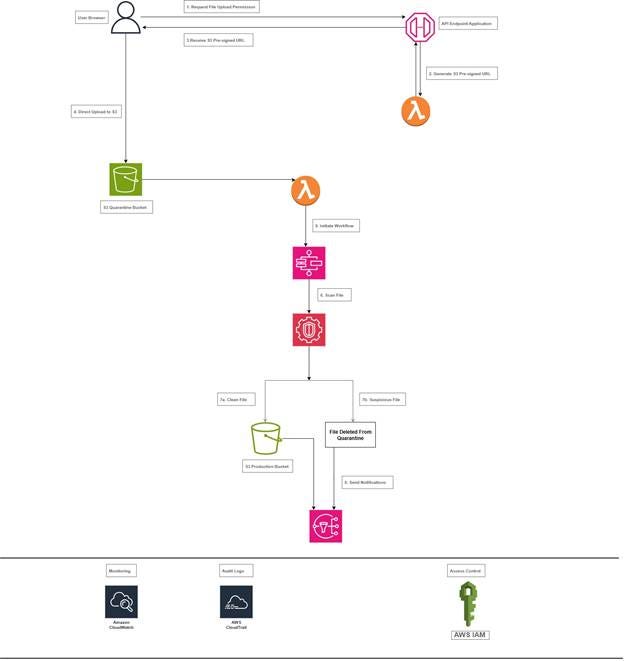
This architecture provides a robust, scalable, and secure file upload system that automatically protects your production environment from malicious files while maintaining a smooth user experience for legitimate uploads.
Flow Description
1. User Authentication and Permission Request
· User interacts with our application to request file upload permission.
· Our app authenticates the user and validates upload rights.
· Application backend verifies user permissions against our authorization system.
2. Pre-signed URL Generation
· Our application calls a Lambda function to generate a pre-signed S3 URL.
· The Lambda function creates a time-limited, secure URL pointing to our quarantine bucket.
· URL includes specific constraints (file size, type, expiration time).
3. Direct Secure Upload
· User receives the pre-signed URL from our application.
· File uploads directly to S3 quarantine bucket, bypassing our application servers.
· This reduces server load and improves upload performance.
4. Quarantine S3 Bucket
· All uploaded files land in a dedicated "quarantine" S3 bucket.
· Bucket has strict IAM policies preventing any external access.
· Files remain isolated until scanning is complete.
5. Automated Scanning Pipeline
· S3 event notification triggers a Lambda function when files arrive.
· Lambda initiates a Step Functions workflow for orchestrated scanning.
6. Malware Detection
· Amazon GuardDuty Malware Protection scans each file for threats.
· Scanning process is fully automated and scalable.
7. File Disposition Logic
· Step Functions moves verified clean files to the production S3 bucket.
· Suspicious or malicious files are immediately deleted.
· All actions are logged with detailed audit trails.
8. Notification and Monitoring
· Amazon SNS sends notifications about scan results.
· CloudWatch monitors the entire pipeline for performance and errors.
· CloudTrail logs all API calls for security auditing.
Key Security Features
S3 Bucket Configuration
ISOLATION: Quarantine bucket prevents malicious files from affecting production systems.
Let's talk about S3 bucket security because this is where most people mess up. I create two separate buckets: one for quarantine and one for clean files. Both are locked down tight with private access only, and encryption is enabled by default.
The quarantine bucket gets extra paranoid settings with versioning enabled and MFA delete protection. MFA delete protection will prevent accidental deletion of our entire quarantine bucket during a "cleanup" effort.
Pre-signed URL Generation
TIME-LIMITED ACCESS: Pre-signed URLs expire quickly to minimize exposure.
Instead of letting users upload directly through your application, generate pre-signed S3 URLs that give temporary, limited access to upload specific files. This approach was a game-changer for me because it offloads the actual file transfer to AWS while maintaining strict control over who can upload what.
I use Lambda functions to generate these URLs with expiration times of 15 minutes max. Any longer and you're giving attackers too much time to figure out ways to abuse the system.
The pre-signed URL approach also means your application servers never have to handle large file uploads, which saves you tons of bandwidth and processing power.
Automated Scanning Pipeline
AUTOMATED SCANNING: Every file is scanned before promotion to production.
This is where the magic happens. For every file that lands in the quarantine bucket, S3 event triggers a Lambda function that initiates a Step Functions workflow for orchestration. GuardDuty scans the uploaded file for malicious content, and a comprehensive threat analysis is performed. Clean files get moved to the production bucket, while suspicious and malicious files get deleted immediately. I log everything because you never know when you'll need that audit trail.
Learn something that initially tripped me up: ensure your Lambda has sufficient memory and a timeout configured for handling large files, or you'll encounter weird timeout errors that can be difficult to debug.
Monitoring
CONTINUOUS MONITORING: CloudWatch monitors the entire pipeline for performance and errors.
Notification
TIMELY NOTIFICATION: Keep security personnel informed about any potential threats.
Nobody wants to sit around wondering if their file upload worked, so I built in automatic notifications using SNS. Clean files trigger a success message to the user, while suspicious and malicious files send alerts to the security team, and trust me, you want those alerts going to multiple people.
The key is to ensure that users receive feedback quickly while keeping security personnel informed about any potential threats.
Setting up proper notification filtering took some trial and error. You don't want to spam your security team with every single file upload, just the ones that need attention.
Audit Logs
AUDIT TRAIL: Complete logging of all file operations and scan results.
CloudTrail logging is non-negotiable; every action gets logged so you can trace exactly what happened if something goes sideways.
IAM and Least Privilege
LEAST PRIVILEGE: IAM roles follow the principle of least privilege access.
Here's where a lot of people get lazy, but IAM roles are critical for this setup. Each Lambda function gets only the permissions it needs, no more, no less. The scanning Lambda can read from quarantine and write to clean buckets, but it can't mess with your production data or user accounts.
I create separate roles for different Lambda functions: one for generating pre-signed URLs, and another for file scanning. This compartmentalization has saved me multiple times when bugs or misconfigurations could have caused broader damage.
Upgrades
If I were building this system for a high-stakes production environment, there are upgrades I'd make immediately.
Firstly, I'd implement S3 Object Lock to prevent anyone from tampering with or deleting quarantined files before they're properly scanned. This is crucial for compliance and forensic purposes.
Secondly, I would consider implementing file content analysis, such as data loss prevention (DLP) to catch accidentally uploaded sensitive information; or machine learning models to detect suspicious file patterns.
The Business Impact
The system I just described might seem like overkill, but the alternative is way worse. One successful malware upload can cost your company millions in downtime, data recovery, regulatory fines, and reputation damage.
The serverless approach keeps costs predictable and low because you're only paying for storage and compute when files are being processed. The ROI becomes pretty quick when compared to maintaining a dedicated scanning infrastructure that sits idle most of the time.
More importantly, this architecture scales automatically with your business growth without requiring constant infrastructure updates.
Lessons Learned
The biggest lesson from building this system? Security isn't something you bolt on afterwards; it has to be designed-in from the ground up. Every decision, from bucket policies to Lambda timeouts, needs to consider the security implications.
User experience should not be forgotten; security that is so cumbersome that people try to work around it isn't security at all.
Your Turn to Build a Secure File Upload System
File upload security isn't just a technical challenge; it is a business necessity that can make or break your company's reputation. The serverless architecture we walked through today provides enterprise-grade security without the associated enterprise-grade complexity and costs.
Take time this week to audit your current file upload processes. Are you doing any validation? Scanning? Proper access controls? If the answer to any of those is "not really," then you've got some work to do, but at least now you have a roadmap.
Remember, the goal isn't to make file uploads impossible; it's to make them safe, reliable, and transparent so users can focus on their work instead of worrying about security threats.
Share Your File Upload Stories
If this architecture helped you identify gaps in your file handling security, I'd love to hear about your implementation challenges and wins. Building secure systems is a team sport, and sharing knowledge makes everyone stronger.
NGOZI U.I. UCHE.